• Home
  • About
  • Solutions
    • Microsoft Dynamics 365 Business Central
    • Microsoft Power BI
    • Microsoft Dynamics 365
    • Dynamics 365 for Customer Engagement
    • Dynamics 365 for Finance and Operations
    • Dynamics 365 for Field Service
  • Industries
    • Trading
    • Construction
    • Financial Services
    • Manufacturing
    • Distribution
    • Services
    • Education
    • Hospitality
  • Services
    • ERP Implementation Partner
    • Microsoft Dynamics Upgrade Services
    • Microsoft Dynamics Support
    • Microsoft Dynamics Training
  • Our IPs
    • Square Trade
    • Square People
    • Privacy Policy
  • Case Studies
  • Resources
    • Blog
    • Careers
    • Our Team
    • Our Clients
  • Contact
  • +971-589800163
  • +971-45897017
  • sales@sqitconsulting.com
Free Demo
  • Home
  • About
  • Solutions

      Microsoft Dynamics 365

      Dynamics 365 Business Central

      Dynamics 365 Finance and Operations

      Dynamics 365 Sales

      Dynamics 365 Customer Insights

      Dynamics 365 Field Service

      Microsoft Power Platform

    • Microsoft Dynamics 365 Business Central
    • Microsoft Power BI
    • Microsoft Dynamics 365
    • Dynamics 365 for Customer Engagement
    • Dynamics 365 for Finance and Operations
    • Dynamics 365 for Field Service
  • Industries
    • Trading
    • Construction
    • Financial Services
    • Manufacturing
    • Distribution
    • Services
    • Education
    • Hospitality
  • Services
    • ERP Implementation Partner
    • Microsoft Dynamics Upgrade Services
    • Microsoft Dynamics Support
    • Microsoft Dynamics Training
  • Our IPs
    • Square Trade
    • Square People
    • Privacy Policy
  • Case Studies
  • Resources
    • Blog
    • Careers
    • Our Team
    • Our Clients
  • Contact
  • Home
  • About
  • Solutions

      Microsoft Dynamics 365

      Dynamics 365 Business Central

      Dynamics 365 Finance and Operations

      Dynamics 365 Sales

      Dynamics 365 Customer Insights

      Dynamics 365 Field Service

      Microsoft Power Platform

    • Microsoft Dynamics 365 Business Central
    • Microsoft Power BI
    • Microsoft Dynamics 365
    • Dynamics 365 for Customer Engagement
    • Dynamics 365 for Finance and Operations
    • Dynamics 365 for Field Service
  • Industries
    • Trading
    • Construction
    • Financial Services
    • Manufacturing
    • Distribution
    • Services
    • Education
    • Hospitality
  • Services
    • ERP Implementation Partner
    • Microsoft Dynamics Upgrade Services
    • Microsoft Dynamics Support
    • Microsoft Dynamics Training
  • Our IPs
    • Square Trade
    • Square People
    • Privacy Policy
  • Case Studies
  • Resources
    • Blog
    • Careers
    • Our Team
    • Our Clients
  • Contact
Newsletter

🆕 Business Central 2025 Wave 1 (BC26.2) – A Game-Changer in Analysis Mode: Add Fields from Related Tables!

By Pawan Gautam 

Home » Blog » Newsletter » 🆕 Business Central 2025 Wave 1 (BC26.2) – A Game-Changer in Analysis Mode: Add Fields from Related Tables!

  • Picture of Pawan Gautam Pawan Gautam
  • |
  • April 16, 2025
  • 12:54 pm

📊 Unleashing Deeper Insights in Business Central

Microsoft Dynamics 365 Business Central just got a powerful upgrade in its 2025 Wave 1 (BC26.2) release — especially for data enthusiasts and power users.

With the new feature, you can now add fields from related tables directly within Analysis Mode, offering a richer and more flexible way to dive into your business data. No more switching views or crafting complex reports — it’s all available within the analysis interface.


🔍 So, What’s New?

The update enables users to:

✅ Insert fields from related tables seamlessly
✅ Keep your analysis within one screen
✅ Choose the insertion point — either at the end or next to a selected column
✅ Analyze master and transactional data side-by-side


🧠 How It Works (Step-by-Step Visuals)

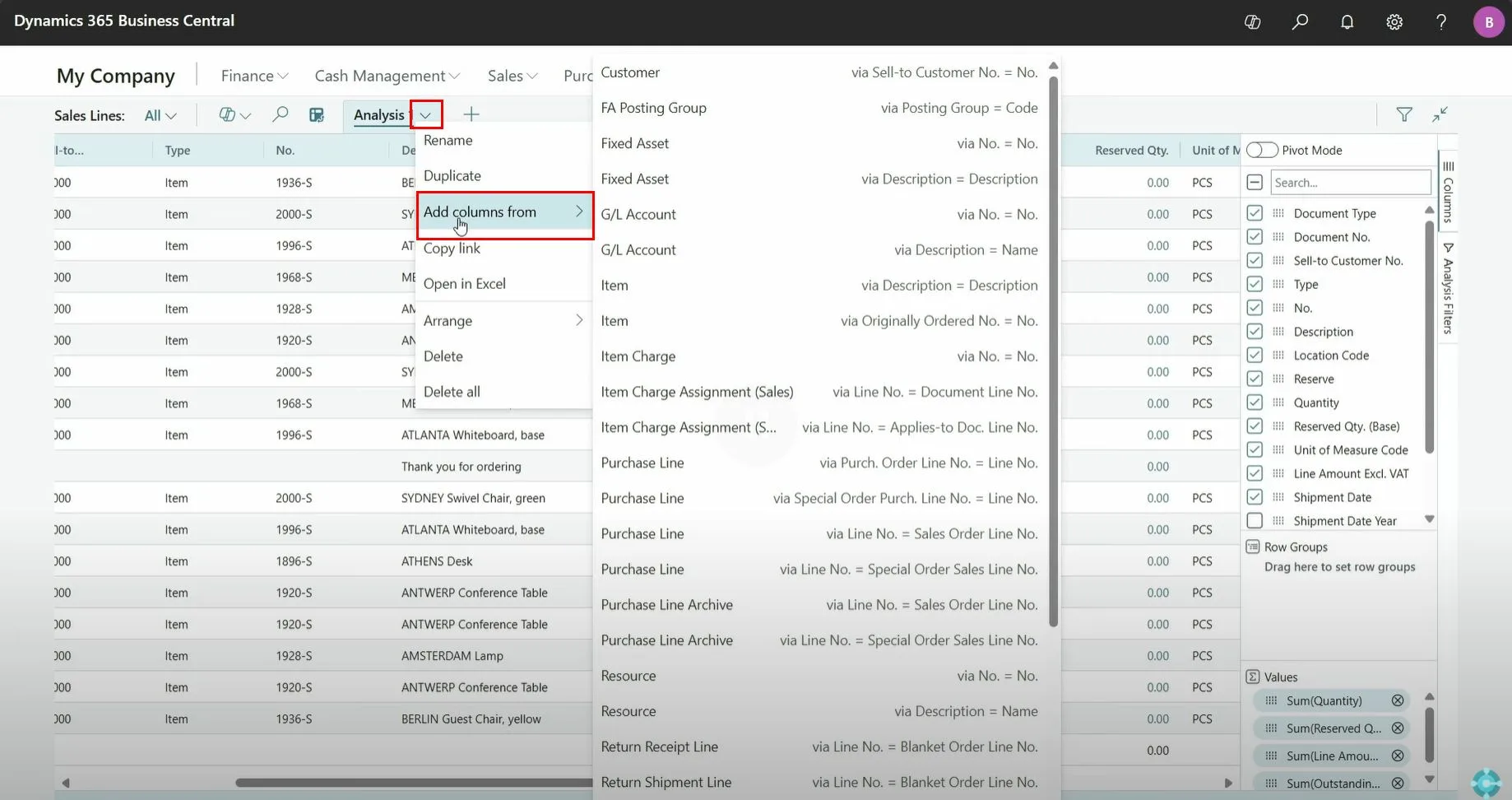
🔸 Simply click the drop-down arrow next to the Analysis View title, then select “Add columns from” to choose a related table.

inserting fields in Microsoft D365 BC

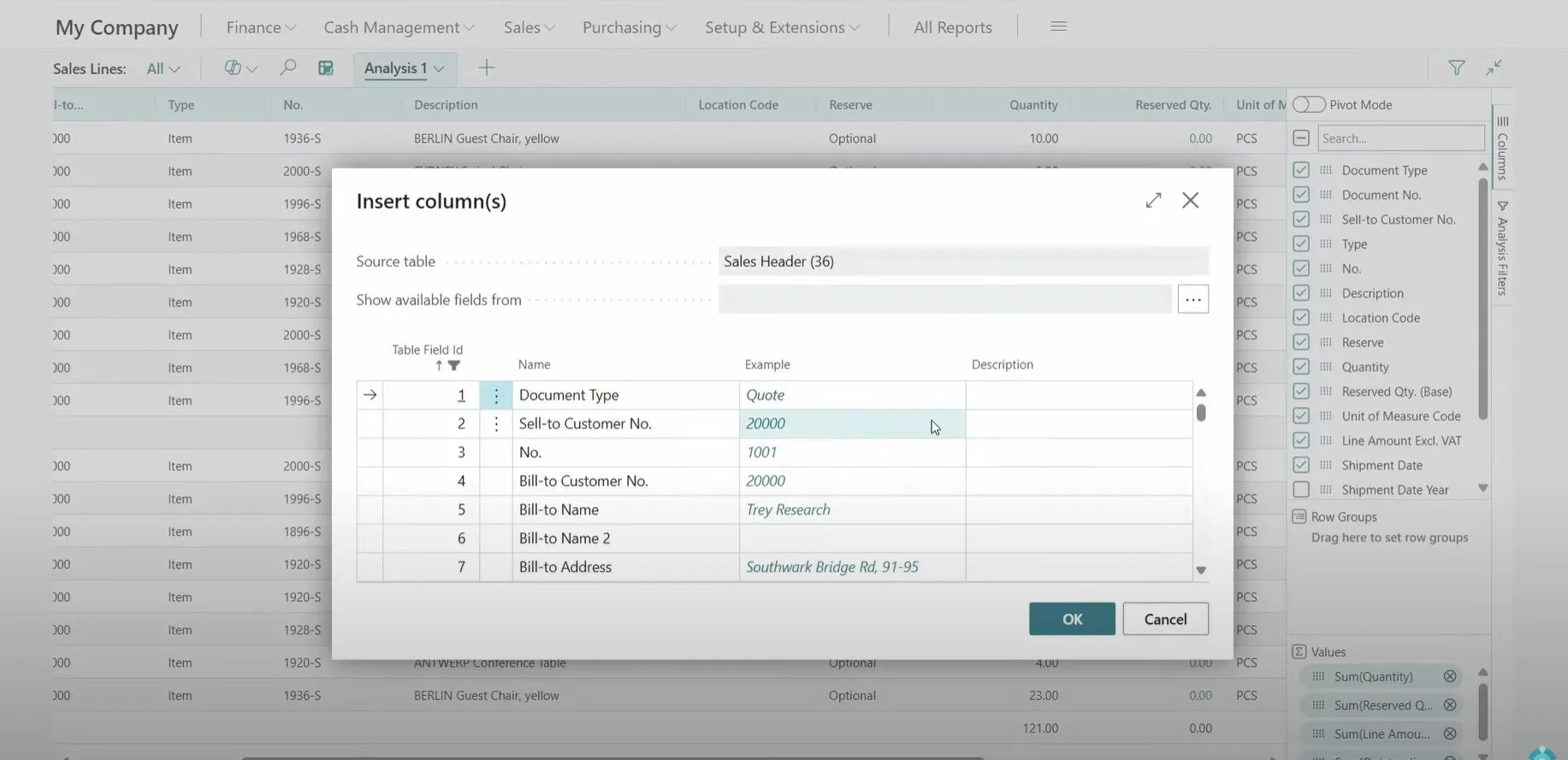
🔸 After selecting the related table (e.g., Sales Header), you’ll be presented with a list of fields to add.

steps to add fields in Microsoft D365 BC

🔄 Whether you’re tracking sales patterns, customer behaviors, or item-level performance, this feature is your new best friend.


🎯 Real-World Use Case

Imagine you’re analyzing Sales Lines and want to include customer details or document types from the Sales Header. Previously, this required setting up separate pages or queries.

Now? A few clicks, and the data is in your view — live, filterable, and sortable.


🎥 Learn It in Action

Microsoft has released a helpful demo walking you through this enhancement: 👉

Video Demo

Want to see it in action? Microsoft’s official walkthrough video shows exactly how this feature works.


💡 Why This Matters

This isn’t just a UI tweak — it’s a data accessibility breakthrough for users who live inside Business Central.

🧩 No need for dev help or custom reports
🧮 More context in every analysis
📈 Smarter, faster decisions
📤 Export to Excel or continue slicing and dicing right inside BC


🚀 Final Thoughts

Microsoft continues to double down on user empowerment and data democratization with features like this.

Have you tried the new “Add columns from related tables” yet? What new insights did it help you unlock?

Let’s talk 👇


Leave A Reply Cancel reply

Your email address will not be published. Required fields are marked *

*

*

📢 AI Just Leveled Up Sales in Business Central — Meet the New Sales Order Agent
Previous Article
Dynamics 365 Business Central 2025 Wave 1: Key Highlights from the Latest Release
Next Article

Quick Links

  • Dynamics 365 Business Central
  • Microsoft Power Platform
  • Square People
  • Square Trade
  • Sitemap
  • Privacy Policy

Square International Technology Consulting DMCC

Regd. Office:

Office No 1408, Tiffany Towers, Cluster W, Jumeirah Lake Towers, Dubai, United Arab Emirates

+971-45897017

+971-589800163

sales@sqitconsulting.com

Facebook Instagram X-twitter Linkedin Medium
© Copyright 2025 | Square International Technology Consulting DMCC